How To Download Books From Ipad To Computer UPDATED
How To Download Books From Ipad To Computer

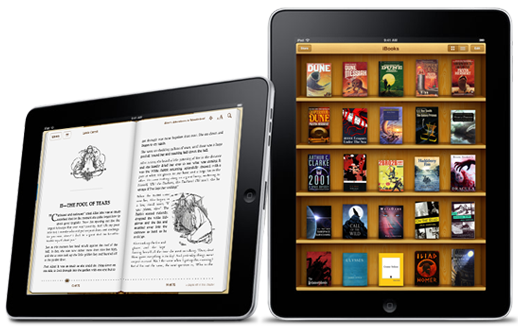
No affair yous are the new users of the iPad or the fans, you may find it a fleck tricky to transfer files or documents from your iPad to your computers. Just with the step-by-step information provided in this article about how to transfer books from iPad to computer, you will accept a chance to transfer books to your computer without stress. You lot can do this through iTunes, email as well as a third-party application. Therefore, if you desire to transfer any ebooks from the iPad to your computer for a fill-in, it is helpful for you to go on this post. Let'south start with the details!
- Solution 1. Transfer Books from iPad to computer with iTunes
- Solution 2. Transfer Books from iPad to Computer by Emails
- Solution 3. Transfer Books from iPad to Reckoner using Third-Political party Apps

DoctorFone - Phone Managing director (iOS)
Transfer Files from PC to iPhone/iPad/iPod without iTunes
- Transfer, manage, export/import your music, photos, videos, contacts, SMS, Apps, etc.
- Backup your music, photos, videos, contacts, SMS, Apps, etc. to computer and restore them easily.
- Transfer music, photos, videos, contacts, messages, etc from i smartphone to another.
- Transfer media files between iOS devices and iTunes.
- Fully compatible with iOS 7 to iOS 13 and iPod.
3981454 people accept downloaded it


Solution 1. Transfer Books from iPad to Computer with iTunes
To complimentary up more infinite on your iPad where you tin shop more than important documents relating to your business and others, you may want to learn how to transfer books from iPad to a computer. If yous have bought books in iTunes Store, you tin can have advantage of the" Transfer Purchases" role of iTunes to get the work washed. Go along following the guide y'all volition know how to do this.
Step 1 Connect iPad to a computer with the USB cable, and iTunes will start automatically. If not, you lot tin can manually start it on your computer.
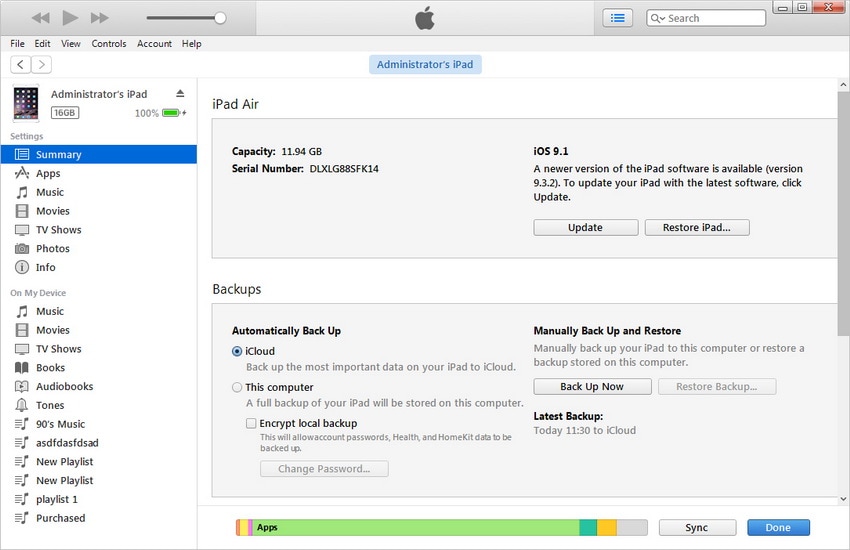
Step 2 Select the targeted tab of Transfer Purchases as shown in the image beneath to transfer all the purchased files from iPad to iTunes Library, including the eBooks.

Solution ii. Transfer Books from iPad to Computer by Email
When it comes to transferring books from iPad to computer, iTunes may help yous to go the piece of work done. Notwithstanding, some other helpful way is using email to transfer eBooks from iPad to computer. Though the iPad is a bang-up tablet, it has the limit from the operating system which doesn't provide the function of direct re-create-paste, so the following guide volition tell yous the procedure of using email to transfer books from iPad to reckoner.
Step ane Go to the iBooks app and select the eBook you desire to transfer. Then open the catalog page of the book.

Step 2 Tap the "Share" icon at the upper left corner of the iPad interface and click the push button of "Mail" in the pop-up menu.

Stride 3 Type your ain email in the address bar and hitting the Ship button to offset sending the ebook to your own email.

When the whole process finishes, you will get the books in your mailbox. All you demand to do is downloading the book from the attachment, and save the books in your local hard drive or your reckoner.
Solution 3. Transfer Books from iPad to Estimator Using Third-Party Apps
Hither nosotros have listed the top five apps to transfer books from iPad to computer, which may provide you some helps when you are about to transfer books from iPad to computer.
1. iMobile AnyTrans
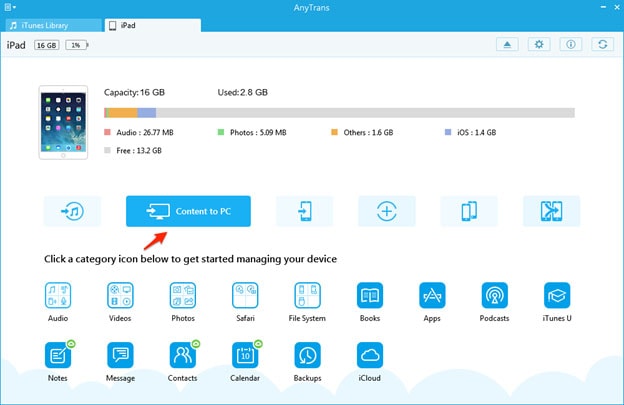
This is one of the apps designed for like shooting fish in a barrel file transfer from iPad to calculator. It is designed to support the piece of cake transfer of nearly 20 different iOS files and documents from iPad toa computer. You tin transfer eBooks and other documents, files, photos, music, text messages, calendar, movies. The first thing y'all demand to do when you want to transfer books from iPad to computer with iMobile AnyTrans is to install the app into your computer and connect your iPad to your computer. Next, you would need to wait for loading the content of your iPad and click the book you want to transfer to the computer and it will be transferred without extra time.
Pros
- Bachelor to transfer more than 20 unlike kinds of iOS contents from iPad to computer
- The speed of transferring is faster than another app
- Easy and simple to employ
- Compatible with all iPad models including the latest iPad
- Designed with an attractive and functional interface
Cons
- Requires an internet connection.
- Difficult to manage audios and videos.
2. SynciOS
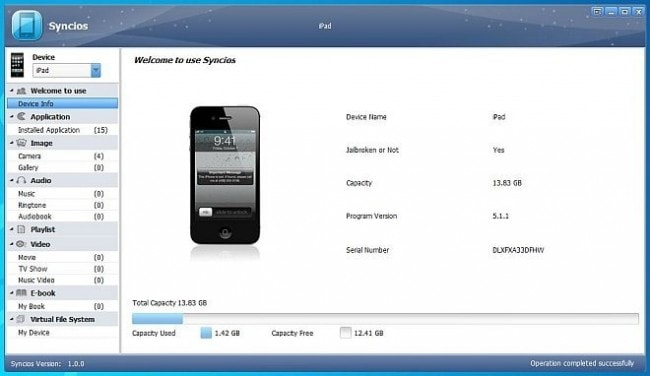
The SynciOS is another alternative tool to transfer books from iPad to computer. This app is fully compatible with different Apple devices including iPad, iPod, and iPhone for like shooting fish in a barrel file transfer. More than and then, this app will not only recognize your iPad merely also display the general info nigh your iPad. Information technology is one of the near popular third-party free apps to transfer books from iPad to calculator.
Pros
- Designed with functional and friendly interface
- Helps for file transfer from iPad to estimator in the rapid speed
- Complimentary-to-apply app
- Comes with features that will let y'all navigate apps every bit well as a continued device
- Back up for transferring books, photos, movies, documents, and others
Cons
- An issue with managing contact.
3. PodTrans
PodTrans is considered to transfer media files just like iTunes. It can also transfer songs, videos, Vocalism memos, podcasts, vocalisation memos, books audiobooks and others from iPad to the calculator for fill-in. With the help of this app, you tin hands, merely transfer books you purchased from Apple Shop to your computer.
Pros
- Nice pattern on the interface
- Sensitive response in the search function
- Available to transfer files from iPod to iPhone and from iPad to PC.
Cons
- PodTrans is unable to catechumen sound format.

4. TouchCopy
One of the best options for a simple and prophylactic fashion to transfer books from iPad to computer is the TouchCopy. It is easy to copy photos, files, documents, and even iBook from iPad to estimator with the functional interface. What is more, you tin can use this transfer app to back up documents and other files from your iPad to a computer within one click. This wonderful app is loaded with enormous advantages in which users will stand up to the benefits.
Pros
- It provides the information the data which can be copied or not.
- It tin can exist used to backup files including contacts, ringtones, text letters, notes, and even voicemail.
Cons
- The interface of this app is not easy to understand at the outset.
- The backup function tin be easily crashed during calendar transfer.
- The quality of your volume can be altered.

v. Aiseesoft iPad Transfer
Another easy way for transferring the books from an iPad to a calculator y'all need is Aiseesoft iPad Transfer. Information technology is featured with the piece of cake steps for you to copy books from the iPad to your computer without hassle. You can non merely transfer your eBooks, but also your files, photos, and documents to a computer, PC or even to iTunes. Another considerable signal from the app is its powerful video editing features in addition to the transferring role. This role makes it one of the best comparison to the other culling apps in the marketplace. There are some pros and cons associated with this app which you need to know.
Pros
- Built with superior video editing features
- Designed with the functional and fashionable interface
- Aid for fastly file transfer from iPad to reckoner
- You can transfer aby books from iPad to computer without whatsoever loss of the quality
Cons
- Does non transfer all album arts.

So at present you are able to transfer books from iPad to reckoner without efforts. Both eBooks and audiobooks can be transferred from iPad to reckoner with the mentioned apps. With these methods, y'all tin hands transfer books to your computer to gratuitous upwardly the storage infinite of your iPad.
Other Popular Manufactures From Wondershare
DOWNLOAD HERE
Posted by: mcbrideprearp.blogspot.com

Post a Comment for "How To Download Books From Ipad To Computer UPDATED"